Showing posts with label Motorola. Show all posts

Motorola Milestone Review (Android Phone)

Author: Doncrack // Category: , , , ,
Taking an interesting step into the world of Android, Motorola brings a new revolutionary handset into the market, namely Milestone. As the name indicated, the phone (Droid in US) proves that it has all the ability to fulfill demand of its user. More commonly, the phone comes with superb package of features & applications. Motorola promoted this latest mobile phone into two different names: Milestone and Droid. But more than that, they came back after such a long shaky performance with something brilliant. Can this Motorola phone deliver what users expect from it? The answer is definitely "Yes" since it has brilliant design structure as well as specifications. Attractive design casing makes it popular mobile phone over the whole mobile market.

Design
The highlighted feature of Motorola Milestone is its beautiful & long 3.7 inches display screen. The quality of display makes its user feel the real experience of digital life. This slider gadget carries a full functional QWERTY keypad at its slide open position and there is also a 5 way navigation key as well letting you enabled to access the each corner of the screen with ease. This mobile phone is pretty hefty to weigh around 165 grams while it is 1.37cm in depth, 6cm in width & 11.58cm in height.

System and features
The Google's latest version of Android operating system is fully loaded on this mobile phone that gives full satisfaction to its operator in browsing. The plus point of using Android OS is the freedom of using favourite applications right from its desktop by widgets.

The spacious display and faster speed makes navigation & internet browsing comfortable & enjoyable and reduces the painful experience as we use in normal mobile phones or even in smart-phones. The operator of new Motorola Milestone phone gets up to 10.2 Mbps of speed for downloading stuffs and 5.76 Mbps for uploading & sharing files. Wi-Fi, Bluetooth and USB port are some other connecting options which you can use for sharing & transferring files to other compatible devices.

Entertainment
A 5 MP camera has been fitted on the back panel of Motorola Milestone that helps is user to takes snaps & develop video clips while they celebrating in party or at any occasion. Rather than just a phone, Motorola's makes this handset a powerful device in terms of multimedia. Most of the media file formats including WMV has been supported by this mobile. Digital compass and GPS support makes it Motorola's most popular phone among the youngsters & business personal.

Full QWERTY keyboard makes typing comfortable and gives less pain to your fingers. Accelerometer sensor has also been included so that user can enjoy motion gaming on this Motorola phone. Nobody can complain about its storing capacity, since it comes with 32GB of memory with the help of microSD card. For FM lovers, this phone will disappoint you, since it doesn't have the ability to play your favourite radio channel. No FM radio in Milestone. Multi-touch input method will definitely amuse you.

Connectivity
This latest touchscreen Motorola mobile will online on various mobile shops of UK very soon. User may compare mobile deals on new Motorola Milestone along with various gift items. Replace your existing phone with this latest device, if you need some better replacement and start searching for cheap contract deals on phone shops of UK.

The smartphone is a primary tool for data exchange and association, and includes facilities such as Wi-Fi Wi-Fi, 3G HSDPA, HSUPA, Bluetooth v2.1 with A2DP and micro USB, GPRS and EDGE. To attract more, gave the company an Adobe Flash Player version 10.1 for the phone so you can enjoy a never felt the media player. This is an HTML browser and select Google search built this device, while Motorola is a milestone in YouTube and Google Talk compatible. The GPS navigation system has been supported by a functioning GPS, Motonave software and Google Maps.

Motorola Mobile Phone Secrets Codes

Author: Doncrack // Category:
motorola secrets codes
Free Motorola Secrets Codes:
Motorola 920 Secrets Codes
---------------
Press menu and type one of these numbers and press OK:

11 = Status Review
13 = Available Networks
14 = Preferred Networks
22 = Select Keypad Tones
25 = Require SIM Card PIN
26 = Language Selection
32 = Repetitive Timer
33 = Single Alert Timer
34 = Set IN-Call Display
35 = Show Call Timers
36 = Show Call Charges
37 = Call Charge Settings
38 = Reset All Timers
43 = Reset All Timers
45 = Show Last Call
46 = Total For All Calls
47 = Lifetime Timer
51 = Change Unlock Code
52 = Master Reset
53 = Master Clear (Warning!! May result in deleting the Message Editor!!!)
54 = New Security Code
55 = Automatic Lock
63 = Battery Saving Mode

Free call tip

1 Enter the phone number
2 Enter OK
3 Type *#06#
4 Press Button C
5 And finally press the button for power off.

You should now be able to talk without being billed.


The 54# Tips Secrets Codes:

Type 1#, 2#........54# on the keypad (when you're not in the menu) to get the phone number used for with this key when speed dialing.


Motorola 930
--------------


Press menu and type one of these numbers and press OK:

11 = Status Review
13 = Available Networks
14 = Preferred Networks
22 = Select Keypad Tones
25 = Require SIM Card PIN
26 = Language Selection
32 = Repetitive Timer
33 = Single Alert Timer
34 = Set IN-Call Display
35 = Show Call Timers
36 = Show Call Charges
37 = Call Charge Settings
38 = Reset All Timers
43 = Reset All Timers
45 = Show Last Call
46 = Total For All Calls
47 = Lifetime Timer
51 = Change Unlock Code
52 = Master Reset
53 = Master Clear (Warning!! May result in deleting the Message Editor!!!)
54 = New Security Code
55 = Automatic Lock
63 = Battery Saving Mode

Free call tip

1 Enter the phone number
2 Enter OK
3 Type *#06#
4 Press Button C
5 And finally press the button for power off.

You should now be able to talk without being billed.


Motorola 930

The 54# Tip:

Type 1#, 2#........54# on the keypad (when you're not in the menu) to get the phone number used for with this key when speed dialing.


Motorola 6200 Secrets Codes
--------------
(Note: pause means the * key held in until box appears)
To activate RBS type: [pause] [pause] [pause] 1 1 3
[pause] 1 [pause] [ok]
You now have to press the [MENU] and scroll to the 'Eng
Field Options' function with the keys, and enable it.

De-activate RBS

To de-activate RBS type: [pause] [pause] [pause] 1 1 3
[pause] 0 [pause] [ok]
This only works with some versions of software.

These countries has been reported working:

UK (Orange)
AU

What's the use of RBS:

Get Distance From Base Station - Place a call, when it
is answered, press [MENU] until 'Eng Field Option' is
displayed, press [OK], select 'Active Cell', press [OK],
press [MENU] until 'Time Adv xxx' appears, where xxx is
a number. Multiply this number by 550, and the result is
the distance from the RBS (Radio Base Station), in
meters.

Get Signal Quality - press [MENU] until 'Eng Field
Option' is displayed, press [OK], select 'Active Cell',
press [OK], press [MENU] until 'C1' appears. This is the
signal quality. If it becomes negative for longer than 5
seconds, a new cell is selected.

Pin Outs

Numbered left to right, keypad up, battery down

1. Audio Ground
2. V+
3. True data (TD) (input)
4. Downlink - Complimentary data (CD) (input)
5. Uplink - Return data (RD) (output)
6. GND
7. Audio Out - on/off
8. Audio In
9. Manual Test - ???
10. Battery Feedback
11. Antenna connector


Motorola 7500
-------------


(Note: pause means the * key held in until box appears)
To activate RBS type: [pause] [pause] [pause] 1 1 3
[pause] 1 [pause] [ok]
You now have to press the [MENU] and scroll to the 'Eng
Field Options' function with the keys, and enable it.

De-activate RBS

To de-activate RBS type: [pause] [pause] [pause] 1 1 3
[pause] 0 [pause] [ok]
This only works with some versions of software.

These countries has been reported working:

IT (model: F16 HW: 5.2 SW: 2.1)


What's the use of RBS:

Get Distance From Base Station - Place a call, when it
is answered, press [MENU] until 'Eng Field Option' is
displayed, press [OK], select 'Active Cell', press [OK],
press [MENU] until 'Time Adv xxx' appears, where xxx is
a number. Multiply this number by 550, and the result is
the distance from the RBS (Radio Base Station), in
meters.

Get Signal Quality - press [MENU] until 'Eng Field
Option' is displayed, press [OK], select 'Active Cell',
press [OK], press [MENU] until 'C1' appears. This is the
signal quality. If it becomes negative for longer than 5
seconds, a new cell is selected.

Pin Outs
Numbered right to left, keypad up, battery down looking

1. Gnd
2. Pos
3. True data (TD) (input)
4. Complimentary data (CD) (input)
5. Return data (RD) (output)
6. Audio gnd
7. Audio out
8. Audioin


Motorola 8200 Secrets Codes
--------------
(Note: pause means the * key held in until box appears)
To activate RBS type: [pause] [pause] [pause] 1 1 3
[pause] 1 [pause] [ok]
You now have to press the [MENU] and scroll to the 'Eng
Field Options' function with the keys, and enable it.

De-activate RBS

To de-activate RBS type: [pause] [pause] [pause] 1 1 3
[pause] 0 [pause] [ok]
This only works with some versions of software.

These countries has been reported working:

ES, AU, NL, BE


What's the use of RBS:

Get Distance From Base Station - Place a call, when it
is answered, press [MENU] until 'Eng Field Option' is
displayed, press [OK], select 'Active Cell', press [OK],
press [MENU] until 'Time Adv xxx' appears, where xxx is
a number. Multiply this number by 550, and the result is
the distance from the RBS (Radio Base Station), in
meters.

Get Signal Quality - press [MENU] until 'Eng Field
Option' is displayed, press [OK], select 'Active Cell',
press [OK], press [MENU] until 'C1' appears. This is the
signal quality. If it becomes negative for longer than 5
seconds, a new cell is selected.

Pin Outs

Numbered right to left, keypad up, battery down looking

1. Audio Ground
2. V+
3. True data (TD) (input)
4. Downlink - Complimentary data (CD) (input)
5. Uplink - Return data (RD) (output)
6. GND
7. Audio Out - on/off
8. Audio In
9. Manual Test - ???
10. Battery Feedback
11. Antenna connector


Motorola 8400 Secrets Codes
-------------
(Note: pause means the * key held in until box appears)
To activate RBS type: [pause] [pause] [pause] 1 1 3
[pause] 1 [pause] [ok]
You now have to press the [MENU] and scroll to the 'Eng
Field Options' function with the keys, and enable it.

De-activate RBS

To de-activate RBS type: [pause] [pause] [pause] 1 1 3
[pause] 0 [pause] [ok]
This only works with some versions of software.

These countries has been reported working:

ES, AU, NL, BE


What's the use of RBS:

Get Distance From Base Station - Place a call, when it
is answered, press [MENU] until 'Eng Field Option' is
displayed, press [OK], select 'Active Cell', press [OK],
press [MENU] until 'Time Adv xxx' appears, where xxx is
a number. Multiply this number by 550, and the result is
the distance from the RBS (Radio Base Station), in
meters.

Get Signal Quality - press [MENU] until 'Eng Field
Option' is displayed, press [OK], select 'Active Cell',
press [OK], press [MENU] until 'C1' appears. This is the
signal quality. If it becomes negative for longer than 5
seconds, a new cell is selected.

Pin Outs

Numbered right to left, keypad up, battery down looking

1. Audio Ground
2. V+
3. True data (TD) (input)
4. Downlink - Complimentary data (CD) (input)
5. Uplink - Return data (RD) (output)
6. GND
7. Audio Out - on/off
8. Audio In
9. Manual Test - ???
10. Battery Feedback
11. Antenna connector


Motorola 8700 Secrets Codes
--------------
*#06# for checking the IMEI (International Mobile Equipment Identity)

Activate RBS

(Note: pause means the * key held in until box appears)
To activate RBS type: [pause] [pause] [pause] 1 1 3
[pause] 1 [pause] [ok]
You now have to press the [MENU] and scroll to the 'Eng
Field Options' function with the keys, and enable it.

De-activate RBS

To de-activate RBS type: [pause] [pause] [pause] 1 1 3
[pause] 0 [pause] [ok]
This only works with some versions of software.

These countries has been reported working:

AU, IT, SG, DE, ES, ZA

What's the use of RBS:

Get Distance From Base Station - Place a call, when it
is answered, press [MENU] until 'Eng Field Option' is
displayed, press [OK], select 'Active Cell', press [OK],
press [MENU] until 'Time Adv xxx' appears, where xxx is
a number. Multiply this number by 550, and the result is
the distance from the RBS (Radio Base Station), in
meters.

Get Signal Quality - press [MENU] until 'Eng Field
Option' is displayed, press [OK], select 'Active Cell',
press [OK], press [MENU] until 'C1' appears. This is the
signal quality. If it becomes negative for longer than 5
seconds, a new cell is selected.


Motorola CD 160 Secrets Codes
---------------


Press menu and type one of these numbers and press OK:

11 = Status Review
13 = Available Networks
14 = Preferred Networks
22 = Select Keypad Tones
25 = Require SIM Card PIN
26 = Language Selection
32 = Repetitive Timer
33 = Single Alert Timer
34 = Set IN-Call Display
35 = Show Call Timers
36 = Show Call Charges
37 = Call Charge Settings
38 = Reset All Timers
43 = Reset All Timers
45 = Show Last Call
46 = Total For All Calls
47 = Lifetime Timer
51 = Change Unlock Code
52 = Master Reset
53 = Master Clear (Warning!! May result in deleting the Message Editor!!!)
54 = New Security Code
55 = Automatic Lock
63 = Battery Saving Mode

Free call tips

1 Enter the phone number
2 Enter OK
3 Type *#06#
4 Press Button C
5 And finally press the button for power off.

You should now be able to talk without being billed.
ahahahhaaha......


Motorola CD 520 Secrets Codes
----------------

Press menu and type one of these numbers and press OK:

11 = Status Review
13 = Available Networks
14 = Preferred Networks
22 = Select Keypad Tones
25 = Require SIM Card PIN
26 = Language Selection
32 = Repetitive Timer
33 = Single Alert Timer
34 = Set IN-Call Display
35 = Show Call Timers
36 = Show Call Charges
37 = Call Charge Settings
38 = Reset All Timers
43 = Reset All Timers
45 = Show Last Call
46 = Total For All Calls
47 = Lifetime Timer
51 = Change Unlock Code
52 = Master Reset
53 = Master Clear (Warning!! May result in deleting the Message Editor!!!)
54 = New Security Code
55 = Automatic Lock
63 = Battery Saving Mode

Free call tips

1 Enter the phone number
2 Enter OK
3 Type *#06#
4 Press Button C
5 And finally press the button for power off.

You should now be able to talk without being billed.


Motorola d460 Secrets Codes
--------------


#06# for checking the IMEI (International Mobile Equipment Identity)

Activate RBS

(Note: pause means the * key held in until box appears)
To activate RBS type: [pause] [pause] [pause] 1 1 3
[pause] 1 [pause] [ok]
You now have to press the [MENU] and scroll to the 'Eng
Field Options' function with the keys, and enable it.

De-activate RBS

To de-activate RBS type: [pause] [pause] [pause] 1 1 3
[pause] 0 [pause] [ok]
This only works with some versions of software.

What's the use of RBS:

Get Distance From Base Station - Place a call, when it
is answered, press [MENU] until 'Eng Field Option' is
displayed, press [OK], select 'Active Cell', press [OK],
press [MENU] until 'Time Adv xxx' appears, where xxx is
a number. Multiply this number by 550, and the result is
the distance from the RBS (Radio Base Station), in
meters.

Get Signal Quality - press [MENU] until 'Eng Field
Option' is displayed, press [OK], select 'Active Cell',
press [OK], press [MENU] until 'C1' appears. This is the
signal quality. If it becomes negative for longer than 5
seconds, a new cell is selected.

Motorola V3688 Secrets Codes
---------------

#06# for checking the IMEI (International Mobile Equipment Identity)

Enhanced Full Rate Codec (EFR):

To Enable EFR press [][][] 119 [] 1 [] OK.
To Disable EFR press [][][] 119 [] 0 [] OK

NOTE: Nothing appears on Screen.

Mobile Phone - Motorola Roi Phone

Author: Doncrack // Category: ,
The Motorola Roi is a Google Android-powered smartphone that has an 8.0-megapixel camera that captures photos and HD videos at 720p-resolution -- viewable on an HDTV through its built-in HDMI port. Users can run multiple applications and pinch-and-zoom while browsing the Web or enjoying music, videos and maps of the world. The Roi has a high-definition 3.7-inch capacitive touch screen display to easily surf Web sites, view YouTube videos and watch live Terrestrial DMB TV.

Motorola Roi Features
  • Five distinct text-input methods, including a 3x4 keypad, full QWERTY, half QWERTY, hand writing and writing pad
  • Large 3.7-inch high-resolution touch screen with screen lock and proximity sensor
  • Built-in 8.0-megapixel camera with Xenon flash and a 720p HD camcorder
  • HDMI-capable to play HD video directly on an HDTV
  • Access Google services such as Android Market to download apps, Gmail, Google Calendar Sync, Google Contact Sync, Google Maps with Street View, Google Maps, Google Quick Search Box, Google Search By Voice, Google Talk and Google Turn-By-Turn Directions
  • Google Maps Navigation with Street View and Latitude for turn-by-turn directions with My Maps, Wikipedia entries and transit lines -- right on the map
  • Optical dictionary scans and translates business cards and automatically stores information in the phonebook
  • Terrestrial DMB to enjoy up to 24 TV and audio channels for fre.

Mobile Phone - Motorola Brute (i680) Phone (Sprint)

Author: Doncrack // Category: ,
Released for Sprint, the Motorola Brute is designed for people in the most extreme conditions. The rugged handset has the features Nextel customers have come to depend on including push-to-talk capabilities with Nextel Direct Connect, business applications support and and Mil Spec durability -- the Brute meets Military Specification 810F for dust, shock, vibration, low temperature, high temperature, low pressure, solar radiation, salt fog, humidity and blowing rain. It integrates a 2.0-megapixel camera with flash, large internal and external color displays, GPS navigation, rubberized housing, music and stereo Bluetooth.

Motorola Brute (i680) Features
  • Certified to Military Standard 810F for dust, shock, vibration, temperature extremes, low pressure and solar radiation
  • Push-To-Talk with up to 20 other Nextel customers and even send voice messages to any email address
  •  Embedded GPS chip for audible and visual turn-by-turn driving directions, mapping and local searches
  •  Built-in 2.0-megapixel auto-focus camera with 4x zoom and video recording capabilities.

Mobile Phone - Motorola Backflip Phone (AT&T)

Author: Doncrack // Category: , ,
Release for AT&T, the Motorola Backflip is designed with a reverse flip form that makes it easy to watch videos, listen to music and view photos, while the QWERTY keyboard lets users type emails, texts, news feeds, social network messages more easily. The Backflip combines social networking with smartphone features -- syncing contacts, posts, messages, photos from Facebook, MySpace, Twitter and email and delivering it to the handset's home screen. Running on Google's Android platform, consumers can navigate easily through menus with the new Backtrack feature -- a touch panel to scroll through the Web, texts, emails and news feeds without blocking the home screen. It also comes with a 3.1-inch touch screen, 5.0-megapixel camera with flash, Bluetooth, and 3G Internet and Wi-Fi.

Motorola Backflip Features
  • Reverse flip design transforms the Backflip into a handsfree video player, music player, digital picture frame and alarm clock
  • Customizable home screen with MotoBlur to sync Facebook, MySpace and Twitter to email, contacts and threads status updates and profile pics through calls, messages and address book
  • Backtrack touch panel -- located behind the home screen -- offers an unobstructed view of Web, texts, emails and news feeds
  • MotoBlur collects texts, social network messages and emails together so consumers conveniently view information by contact history or in groups
  • Continuously updates with backups into a secure environment so users are connected and protected, even if they lose their phone
  • Built-in 5.0-megapixel auto-focus camera with flash, zoom and video recording capabilities
  • Wi-Fi and HSDPA 3G connectivity for access to high-speed Internet on the road.

Motorola Karma QA1

Author: Doncrack // Category:
The Motorola Karma QA1 is an entry-level slider with full QWERTY keyboard and homescreen access to MySpace and Facebook. Targeted at teenagers and young adults, the Karma has a 2.5-inch 240 x 320 display, 3.6Mbps HSDPA, 2-megapixel camera with video transcription functionality and a microSD bill slot. The media player supports frequence and video and has both a 3.5mm headphone jack and A2DP stereo Bluetooth 2.0 support. There’s even A-GPS and AT&T load their Navigator PND app onto the handset.

Some of Karmas another features include a full HTML browser, ambulatory email support including AOL, Yahoo!, and Windows Live Mail, and it crapper receive and beam SMS and MMS messages. There is also voice-memo recording, a speakerphone, and CrystalTalk astir background noise filter. AT&T will be selling the Motorola Karma QA1 beginning June 28th and it will be priced at $79.99 after a $50 mail-in rebate. Also plan to budget for a minimum of a $39.99 vocalise plan and $20 data or messaging plan.
Motorola Karma™ QA1 Specs:

Talk and Standby Time:
GSM TT: 312 min
WCDMA TT: 217 min
GSM ST: 347 hrs
WCDMA ST: 366 hrs3

Bands/Modes:
3G 850/1900 Dual Band; GSM Quad Band 850/900/1800/1900; GPRS / EDGE Class 101

Weight:
141g/4.97 oz

Dimensions:
64 x 88 x 17.9 (mm)

2.52 x 3.46 x .7 (in)

Battery:
1170 mAh

Connectivity:
Stereo Bluetooth2 w/ A2DP, USB 2.0 Full Speed, 3.5mm Headset Jack

Display:
2.5” QVGA 240×320 262k

Messaging:
SMS, MMS, IM w/ presence, Email (POP3, IMAP4, SMTP), Message Threading1

Audio:
MIDI, MP3, AAC, AAC+, eAAC+, RealAudio, XMF

Video:
Capture/Playback/Streaming, 15 FPS, H.263, MPEG4, Video Share1

Camera:
2.0 megapixel w/ 8x digital zoom

Memory:
100MB user available memory, MicroSD up to 16 GB

Form Factor:
Full QWERTY Slider


Motorola Introduces Rival A455 Messaging Phone

Author: Doncrack // Category:
Motorola Rival A455

Motorola introduces a newborn messaging sound - Rival A455 in Canada on the TELUS network. Canada is the most famous land to beam texting. So, the company is trying to give A455 messaging ambulatory to the country.

The ambulatory sound is enthusiastic in look. It has some enthusiastic functionality and features also. Motorola A455 supports QWERTY keyboard and boasts of SMS features. It gives the undergo of touching to beam texts, emotions and fast messages.

The Motorola A455 comes in digit colours – purple and keep silver. A455 Rival allows users to make a call using an external touch paid dialer without opening the slider. The sound is equipped with base features like – 2MP camera for normal photography. It has capacity to store 500 book massages. It is the biggest function of this sound which has never been seen in some mobile. It has decent media contestant which supports a 3.5 mm jack. Memory of the sound crapper be swollen up to 8GB.

Motorola A455 Rival is equipped with preinstalled IM clients. In Canada the sound will available on stores low three-year contract. Still it has not been declared the sound as global.

We crapper feature that Motorola introduces a newborn traveller sound that called Rival A455. We crapper conclude features of the ambulatory sound as:

Touch dial pad

Fast EVDO connectivity

Slide-out QWERTY keyboard

AOL Instant Messenger

Windows Messenger

Yahoo Messenger

Talk Time Up to 320 min

Supports CDMA 800 / 1900, CDMA 1X/EV-DO Release 0

4.4 oz Weight

20. x 3.8 x .71 inches dimension

WAP browser

940.00 mAh Battery

Bluetooth +EDR3, 3.5mm, USB 2.0 FS

2.2\" 176x220 65K display

MMS, SMS, EMS, IM, Email

AAC, AAC+, AAC+ Enhanced, MIDI, MP3 & WMA

Video

H.263, H.264, MPEG4 & WMV

2 megapixel digital camera with fixed focus

130MB user memory

GPS / VZ Navigator

Motorola is the famous name in ambulatory communication. Motorola launches simple and sharp ambulatory phones. Again it has introduces as A455 a enthusiastic traveller sound but it is ease only for Canada. We crapper move the sound globally but it has not been revealed to launch as globally still.

BLACKBERRY MOTOROLA SONY ERICSSON INFO

Author: Doncrack // Category: , , , , , ,
This is Information about New nokia, blackberry, apple, motorola, beyond, dopod, lg mobile phones. you can choosing this one.

MOTOROLA MILESTONE
"NEW"
Rp. 7.900.000,-
PDA SQUARE
Phone Store | Ponsel Detail

APPLE IPHONE 3GS 32GB
"NEW"
Rp. 9.000.000,-
SARANG PDA.COM
Phone Store | Ponsel Detail

SE X1
"FSET"
Rp. 2.800.000,-
PDA SOLUTION
Phone Store | Ponsel Detail
BLACKBERRY BOLD
"FSET"
Rp. 3.725.000,-
MICHELLINDO CELL
Phone Store | Ponsel Detail

BLACKBERRY 8310
"LKP"
Rp. 2.450.000,-
UTAMA CELL
Phone Store | Ponsel Detail

BLACKBERRY 8520 GEMINI
"NEW"
Rp. 2.900.000,-
TTM SHOP
Phone Store | Ponsel Detail
PHILIPS 9@9z
"NEW"
Rp. 470.000,-
VALENCIA CELL
Phone Store | Ponsel Detail

BLACKBERRY JAVELIN
"NEW"
Rp. 4.400.000,-
SPINER MOBILE
Phone Store | Ponsel Detail

SE W830
"LKP"
Rp. 750.000,-
DIGITAL CELL
Phone Store | Ponsel Detail


SE K320i
"NEW"
Rp. NEGO,-
COMPATIBLE CELL
Phone Store | Ponsel Detail

SE W580
"LKP"
Rp. 750.000,-
MAX CELL
Phone Store | Ponsel Detail

MOTOROLA ZN200
"NEW"
Rp. 750.000,-
LOW PROFILE
Phone Store | Ponsel Detail
BLACKBERRY 9700 ONYX
"NEW"
Rp. 5.300.000,-
BURSA CELL
Phone Store | Ponsel Detail

MOTOROLA Q9
"NEW"
Rp. 1.800.000,-
FIFANY CELL
Phone Store | Ponsel Detail

NOKIA N97
"NEW"
Rp. 6.500.000,-
GRAHA CELL
Phone Store | Ponsel Detail


BLACKBERRY 8320
"FSET"
Rp. 1.900.000,-
BLITZ COMM
Phone Store | Ponsel Detail

BEYOND B89
"NEW"
Rp. 1.300.000,-
TOP SELULAR2
Phone Store | Ponsel Detail

BLACKBERRY 8520GEMINI
"FSET"
Rp. 2.550.000,-
AFAF CELL
Phone Store | Ponsel Detail
PSP SLIM "3006"
"NEW"
Rp. 2.500.000,-
CELLULAR PHONE
Phone Store | Ponsel Detail

SAMSUNG S3653
"NEW"
Rp. 1.730.000,-
123 CELL
Phone Store | Ponsel Detail

SE T290
"LKP"
Rp. 225.000,-
HOME CELL
Phone Store | Ponsel Detail


DOPOD 818pro
"BTG"
Rp. 525.000,-
RAFAEL CELL
Phone Store | Ponsel Detail

NOKIA 6500 C
"LKP"
Rp. 950.000,-
V CELL
Phone Store | Ponsel Detail

SE W830D
"LKP"
Rp. 690.000,-
NINDIA CELL
Phone Store | Ponsel Detail
LG KU990
"LKP"
Rp. 1.650.000,-
GLORY PHONE
Phone Store | Ponsel Detail

O2 XDA STEALTH
"LKP"
Rp. 1.070.000,-
EZA CELL
Phone Store | Ponsel Detail

LG KU990
"LKP"
Rp. 1.600.000,-
AHMAD PHONE
Phone Store | Ponsel Detail


O2 XDA STEALTH
"LKP"
Rp. 1.030.000,-
TNT
Phone Store | Ponsel Detail

NOKIA N95
"SILVER"
Rp. 1.650.000,-
LARIS CELL
Phone Store | Ponsel Detail

BLACKBERRY 8100
""
Rp. 950.000,-
X CELL
Phone Store | Ponsel Detail


NOKIA 8800SIROCO
"LKP, BLACK"
Rp. 2.350.000,-
MEIFONE
Phone Store | Ponsel Detail

SE W850
""
Rp. 825.000,-
TAKAZZA CELL
Phone Store | Ponsel Detail

SAMSUNG D900
"LKP"
Rp. 750.000,-
THIFANI CELL
Phone Store | Ponsel Detail


BLACKBERRY 8310
""
Rp. 1.350.000,-
HAPPY CELL
Phone Store | Ponsel Detail
NOKIA 580O
""
Rp. 2.200.000,-
MYCOM
Phone Store | Ponsel Detail


PASTI MARINE
""
Rp. 975.000,-
CDMA-ONLINE
Phone Store | Ponsel Detail

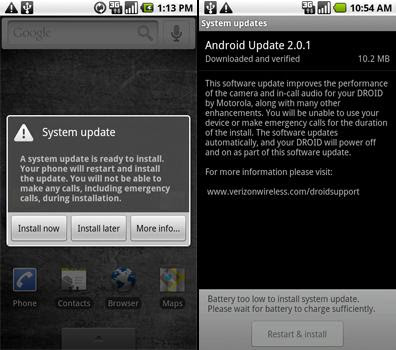
Android 2.0.1 Update for Motorola DROID

Author: Doncrack // Category: , ,

Google is actively improving its operative system for mobile devices. Android 2.0.1 is already available for Motorola DROID. Updated OS has some substantial improvements and bug fixes. Besides it is more stable and has meliorate performance. Here are the list of the most important issues - long battery life, meliorate autofocusing functionality, reinforced frequence for inbound calls, enhancements for three-way calling, reinforced Bluetooth functionality (background reflexion is eliminated), updated corporate calendar widget, reinforced SMS and MMS functionality (now SMS and MMS haw be sent to 7-digit addresses). Android 2.0.1 update can be downloaded from authorised Verizon’s site.

Sponsored by MobTech

Motorola Cliq announced with Motoblur Interface

Author: Doncrack // Category:
Motorola just announced their first Android based handset called the Motorola Cliq. Like HTC and their SenseUI, Motorola has developed a custom user-interface for their Android handsets called Motoblur with a heavy focus on social networking. A bit like Palm’s WebOS, Motoblur will synchronize all your social networking contacts with your phonebook contacts. Updates to contacts, posts, messages, photos and more are streamed together and synced from sources including Facebook®, Twitter™, MySpace®, Gmail™, and work and personal e-mail. MOTOBLUR automatically delivers these updates to the home screen in easy-to-view streams so there is no need to open and close different mobile applications to keep up with the latest content.


The device itself features a 528MHz CPU, 3.1″ HVGA multi touch-screen display, a 5 megapixel auto focus camera with video capture and playback at 24 frames per second, a 3.5mm headset jack, a music player with pre-loaded Amazon MP3 store application, Shazam, iMeem Mobile, and a pre-installed 2GB microSD memory card with support for up to 32 GB of removable memory.

CLIQ also features multitasking capabilities and one-touch access to the Google™ mobile services millions use every day, including Google Search™ by voice, Google Maps™ with Street View, YouTube™ and Picasa™. Easy access to both personal and corporate e-mail, calendars, and contacts is supported by Exchange Server and Gmail. E-mail and contacts are also supported by Yahoo!, Windows Live Hotmail, and other POP3 and IMAP e-mail services. It also combines instant messaging support for Google Talk™, as well as AOL®, Yahoo! Messenger® and Windows Live Messenger.

Author: Doncrack // Category:
A new phone has been praised for its ability to combine a full-sized qwerty keypad with a host of other features in a compact package.

In an article for Mobile Burn, Marc Lynde looked at the Motorola A455 Rival and explained the device will target the same kind of market as the LG enV3 and Samsung's Alias 2.

Recommended Handset

news, Motorola,Motorola A455 Rival 'a compact qwerty package'

Motorola L6 Pink

* Polyphonic Tones
* Bluetooth Voice & Data
* Email

Best Motorola L6 Pink Deal

Racoon 25 (18mth)

* Phone Price: FREE
* Line Rental: £24.47
* FREE Minutes: 300
* FREE Texts: 100

However, there are additional options onboard the model that will attract "a youthful audience" such as a silver or purple finish, 2.2-inch touchscreen display and a 3.5mm headphone jack "that is sure to please".

In addition, the reviewer added call audio quality is good and the handset's signal strength, battery life and user interface all performed well under testing.

"[Consumers] looking for a great device that has support for a variety of features that can rival a smartphone, I would recommend taking a look at the Motorola Rival," Mr Lynde concluded.

The model offers an integrated media player with support for aac, aac+, aac+ enhanced, midi, mp3 and wma files.

Which is more important - the full qwerty pad or the headphone socket?

MobileShop

Motorola ZN300 Is On Official Site

Author: Doncrack // Category:
Motorola ZN300 might not have been officially announced just yet, but the device already has a page on Motorola’s official site. Features of this quad-band GSM phone are available from said webpage. The ZN300 will have features such as a 3.1 megapixel camera with LED flash, 8x digital zoom, FM radio, Bluetooth and a whopping 17 days of standby time. There aren’t any pricing or availability details regarding this phone just yet, but we’re sure that it will be dug up sooner rather than later.

Harga HP Motorola Terbaru April 2009

Author: Doncrack // Category:
Motorola V8 Luxury

motorola_v8_luxury_t1.jpg

Update:04/03/2009
Gr.Resmi:Rp.6.400.000,-
Harga Bks:Rp.4.000.000,-
Rating: ****
Dilihat: 1442

Motorola V6

motorola-razr_maxx-v6_t1.gif

Update:04/03/2009
Gr.Resmi:Rp.2.150.000,-
Harga Bks:Rp.1.650.000,-
Rating: ***
Dilihat: 1256

Motorola MOTO Q9H

motorola_moto_9qh_t1.jpg

Update:04/03/2009
Gr.Resmi:Rp.4.000.000,-
Harga Bks:Rp.3.400.000,-
Rating: None
Dilihat: 1901

Motorola RAZR2 V9

motorola_razr_v9_t1.jpg

Update:04/03/2009
Gr.Resmi:Rp.3.700.000,-
Harga Bks:Rp.3.200.000,-
Rating: ***
Dilihat: 1459

Motorola RAZR2 V8

motorola-razr2_v8_t1.gif

Update:04/03/2009
Gr.Resmi:Rp.2.500.000,-
Harga Bks:Rp.2.000.000,-
Rating: None
Dilihat: 1413

Motorola ROKR E8

motorola-rokr_e8_t1.gif

Update:04/03/2009
Gr.Resmi:Rp.2.850.000,-
Harga Bks:Rp.2.400.000,-
Rating: None
Dilihat: 1676

Motorola Moto Q

motorola-q_t1.gif

Update:16/08/2008
Gr.Resmi:Rp.2.925.000,-
Harga Bks:Rp.2.450.000,-
Rating: *****
Dilihat: 2554

Motorola EM30

motorola-em30_t1.jpg

Update:04/03/2009
Gr.Resmi:Rp.1.960.000,-
Harga Bks:Rp.-
Rating: None
Dilihat: 680

Motorola ZN5

motorola_zn5_t1.jpg

Update:04/03/2009
Gr.Resmi:Rp.3.850.000,-
Harga Bks:Rp.3.400.000,-
Rating: None
Dilihat: 258

Motorola ZN200

motorola-zn200_t1.jpg

Update:04/03/2009
Gr.Resmi:Rp.1.500.000,-
Harga Bks:Rp.1.200.000,-
Rating: None
Dilihat: 1215

Motorola W388

motorola-w388_t1.jpg

Update:04/03/2009
Gr.Resmi:Rp.775.000,-
Harga Bks:Rp.550.000,-
Rating: **
Dilihat: 1333

Motorola W213

motorola-w213_t1.jpg

Update:04/03/2009
Gr.Resmi:Rp.390.000,-
Harga Bks:Rp.300.000,-
Rating: None
Dilihat: 507

Motorola W175

motorola-w175_t1.jpg

Update:04/03/2009
Gr.Resmi:Rp.315.000,-
Harga Bks:Rp.200.000,-
Rating: None
Dilihat: 984

Motorola W231

motorola-w231_t1_1.jpg

Update:04/03/2009
Gr.Resmi:Rp.550.000,-
Harga Bks:Rp.400.000,-
Rating: None
Dilihat: 1231

Motorola Z6

motorola-rizr_z6_t1.gif

Update:04/03/2009
Gr.Resmi:Rp.-
Harga Bks:Rp.1.600.000,-
Rating: None
Dilihat: 920

Motorola ROKR E6

motorola-rokr_e6_t1.gif

Update:04/03/2009
Gr.Resmi:Rp.2.350.000,-
Harga Bks:Rp.1.800.000,-
Rating: None
Dilihat: 2113

Motorola A1200

motorola-a1200_t1.gif

Update:26/02/2008
Gr.Resmi:Rp.-
Harga Bks:Rp.1.850.000,-
Rating: ***
Dilihat: 1942

Motorola ROKR E2

motorola-rokr_e2_t1_2.gif

Update:04/03/2009
Gr.Resmi:Rp.-
Harga Bks:Rp.850.000,-
Rating: *****
Dilihat: 1752

Motorola V3xx

motorola-v3xx_t1.gif

Update:04/03/2009
Gr.Resmi:Rp.-
Harga Bks:Rp.1.200.000,-
Rating: None
Dilihat: 1717

Motorola L72

motorola-l72_t1.gif

Update:04/03/2009
Gr.Resmi:Rp.-
Harga Bks:Rp.925.000,-
Rating: None
Dilihat: 1484

Motorola VE538

motorola-ve538_t1.jpg

Update:04/03/2009
Gr.Resmi:Rp.1.800.000,-
Harga Bks:Rp.-
Rating: None
Dilihat: 270

Motorola RAZR V3x

motorola-v3x_t1.gif

Update:04/03/2009
Gr.Resmi:Rp.-
Harga Bks:Rp.1.100.000,-
Rating: None
Dilihat: 1808

Motorola V3i Gold

motorola-v3i_t1.gif

Update:21/03/2008
Gr.Resmi:Rp.1.700.000,-
Harga Bks:Rp.-
Rating: None
Dilihat: 1560

Motorola W510

motorola-w510_t1.gif

Update:25/09/2008
Gr.Resmi:Rp.1.235.000,-
Harga Bks:Rp.800.000,-
Rating: None
Dilihat: 1524

Motorola W181

motorola-w181_t1.jpg

Update:04/03/2009
Gr.Resmi:Rp.375.000,-
Harga Bks:Rp.300.000,-
Rating: None
Dilihat: 1714

Motorola W396

motorola_w396_t1.jpg

Update:04/03/2009
Gr.Resmi:Rp.935.000,-
Harga Bks:Rp.750.000,-
Rating: None
Dilihat: 652

Motorola K1

motorola-krzrk1_t1.gif

Update:04/03/2009
Gr.Resmi:Rp.-
Harga Bks:Rp.900.000,-
Rating: ***
Dilihat: 1383

Motorola W362 CDMA

motorola-w362_t1.jpg

Update:18/11/2008
Gr.Resmi:Rp.990.000,-
Harga Bks:Rp.700.000,-
Rating: ***
Dilihat: 1650

Motorola V3i

motorola-v3i_t1.jpg

Update:04/03/2009
Gr.Resmi:Rp.1.325.000,-
Harga Bks:Rp.900.000,-
Rating: None
Dilihat: 2551

Motorola SLVR L7

motorola-slvr-l7_t1.gif

Update:04/03/2009
Gr.Resmi:Rp.-
Harga Bks:Rp.750.000,-
Rating: None
Dilihat: 1383
 
Copyright Mobile Phone | Phone Reviews | Powered by BloggerTheme by Donkrax